
Choosing between a laptop and a desktop is less about finding the “better” computer and more about deciding which compromises fit your routine. Modern laptops can handle demanding work, gaming and creative tasks, while desktops still offer advantages in sustained performance, cooling, repairability and upgrades. The right choice depends on where you work, what software you use and how much flexibility you need.
A useful way to approach a laptop vs desktop decision is to picture an ordinary workday. Will the computer stay on one desk, connected to a large monitor and several peripherals? Or will it move between home, an office, university or client meetings? That daily pattern often matters more than headline specifications.
Performance: desktops usually have more room to breathe
Two computers can use components from the same product family yet deliver different real-world results. Desktops have larger cases, stronger cooling and fewer power restrictions, so they can often sustain high performance for longer. That matters for 3D rendering, high-resolution video editing, software development and high-frame-rate gaming.
Laptops are designed around efficiency, battery life, temperature and size. Their compact cooling systems have to balance speed with heat and power use. High-end laptops can still be extremely capable, but performance varies by model because cooling design and power limits matter. For browsing, office work, streaming and light creative tasks, the difference may be small.
Portability: the laptop advantage is more than carrying it
Laptop portability means your screen, keyboard, trackpad, speakers and battery travel with the computer. You can move from a desk to a meeting room or work while travelling without rebuilding your setup. For students, hybrid workers and anyone who regularly changes location, that convenience is often decisive.
A desktop is tied to a workspace and normally needs a display, keyboard, mouse and mains power. That limitation can become an advantage: a permanent workstation can use a larger monitor, full-size keyboard and more comfortable ergonomics without worrying about weight or battery life.
Upgrade options and repairability
Desktop upgrades are one of the strongest reasons to choose a tower PC. Depending on the system, you may be able to replace or add storage, memory, a graphics card, cooling and other components. This modular design can extend the computer’s useful life because you can improve one weak area instead of replacing everything.
Laptops are less consistent. Some allow storage or memory upgrades, while many thin models have soldered memory or limited internal access. CPU and GPU upgrades are generally not practical in mainstream laptops. Before buying, check the exact model’s specifications or service information rather than assuming a component can be replaced later.
Price and total setup cost
A simple price comparison can be misleading. A laptop already includes a display, keyboard, pointing device, webcam and battery. A desktop may offer more performance for the money, but you may need to add a monitor and peripherals.
Desktops can be especially good value when performance is the priority, while laptops can provide better overall value when mobility and an all-in-one package are essential.
Gaming and creative work
For gaming, a desktop usually gives you more freedom to choose cooling, graphics hardware, storage and monitor options. It is also easier to upgrade the graphics card later if the power supply and case support it. A gaming laptop makes sense when you need serious performance in more than one location, but expect less flexibility for future upgrades.
Creative professionals face a similar trade-off. A desktop is attractive for long rendering sessions, large local storage and multi-monitor workflows. A laptop is valuable for photographers, designers and editors who work on location. In either format, the specific processor, graphics capability, memory, storage and display quality matter more than the label alone.
Everyday work, study and home use
If your workload mainly involves web apps, documents, email, video calls and streaming, both formats can perform well. The decision becomes one of convenience. A laptop is easier to move and store; a desktop creates a stable workspace and can be more comfortable for long sessions.
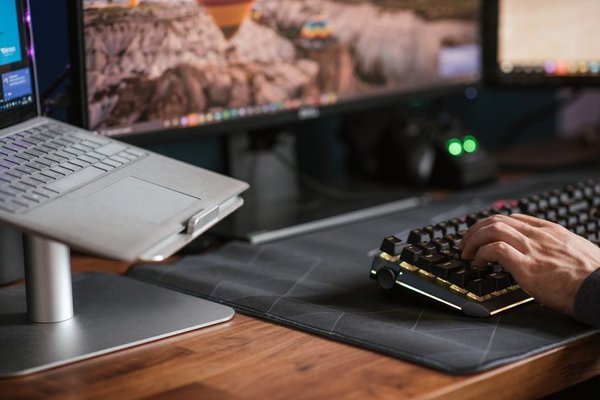
Consider someone who works from home four days a week but spends one day at a shared office. A laptop paired with a dock, external monitor, keyboard and mouse can provide a desktop-like setup at home while remaining portable for that office day. By contrast, someone working exclusively from a home studio on long video projects may benefit more from a desktop’s cooling, storage expansion and upgrade path.
Space, noise and energy use
A laptop takes little desk space and can be packed away. Desktops range from compact mini PCs to large towers, so space requirements vary. Larger systems can fit bigger cooling systems and may handle sustained workloads more comfortably, although any powerful computer can become noisy under heavy load.
How to choose between a desktop or laptop
Start with the tasks you cannot compromise on. If you must carry the computer several times a week, a laptop is the practical starting point. If maximum sustained performance, easy repair or component upgrades matter more than mobility, start with a desktop. Then compare actual models by processor, graphics, memory, storage, ports, display needs and warranty.
Useful related topics to explore include laptop buying guide, how much RAM you need, and desktop PC upgrade guide. These can help narrow the decision once you know which computer format suits your routine.
Frequently asked questions
Is a desktop more powerful than a laptop?
Not automatically. Performance depends on the exact components and configuration. However, desktops usually have more cooling capacity and fewer power constraints, which can help them sustain stronger performance during demanding workloads.
Should I buy a laptop or desktop for working from home?
Choose a laptop if you need to move between locations. Choose a desktop if you work in one place, value a permanent ergonomic setup and want easier upgrades. A laptop with a dock and external monitor can combine mobility with a comfortable home workstation.
Which lasts longer, a laptop or desktop?
Either can last for years with sensible care, but desktops often have an advantage in repairability and component replacement. Laptop longevity depends more heavily on build quality, battery health and serviceability.
Is a desktop cheaper than a laptop?
A desktop can provide more performance for the money, especially if you already own a monitor and peripherals. A laptop includes its display, input devices and battery, so compare total setup cost rather than computer price alone.
Which computer should you choose?
Choose a laptop when mobility, compact storage and an integrated setup are central to how you work. Choose a desktop when you want stronger sustained performance, a permanent workstation, easier repairs or a better upgrade path. For many buyers, the clearest answer comes from deciding where the computer will be used most often and which tasks push the hardware hardest. Once those two questions are settled, the rest of the computer comparison becomes much easier.