
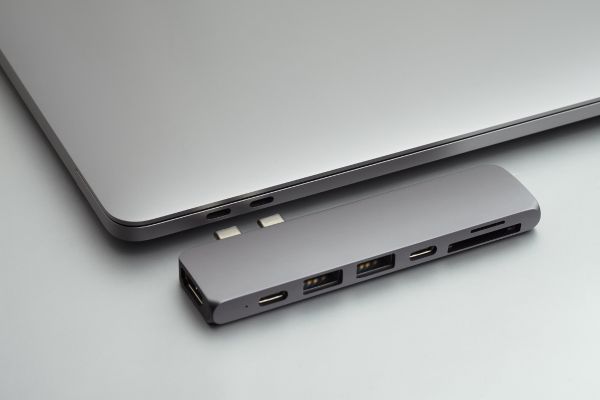
Laptops have become thinner, lighter, and more powerful—but there’s been a quiet trade-off along the way. Ports disappeared. HDMI, Ethernet, SD card readers, even plain old USB-A slots have slowly vanished in favor of a couple of sleek USB-C openings. That design choice looks great in a product photo, but it often leaves real people juggling adapters, cables, and workarounds.
That’s where multiport hubs for laptops step in. Not as flashy accessories, not as status symbols, but as practical tools that quietly restore balance to modern computing. A good hub doesn’t draw attention to itself. It simply makes your laptop feel whole again.
This article looks at what multiport hubs are, how they fit into everyday laptop use, and what actually matters when choosing one—without hype, sales talk, or exaggerated promises.
Why Laptops Need Multiport Hubs Now
The modern laptop is built around portability. Manufacturers assume you’ll work wirelessly, store files in the cloud, and present content without cables. In reality, most people still plug things in. External monitors, wired keyboards, USB drives, memory cards, projectors, Ethernet cables—they haven’t gone anywhere.
Multiport hubs exist because laptop design moved faster than how people actually work. A single USB-C port can theoretically do everything: power, video, data. A hub simply splits that capability into usable, familiar connections. Instead of forcing users to choose between charging or connecting a display, a hub allows both to happen at once.
For many users, this isn’t about convenience—it’s about functionality. Without a hub, a laptop can feel oddly limited, even if its internal hardware is excellent.
What a Multiport Hub Actually Does
At its core, a multiport hub is a translator. It takes one high-capacity port on your laptop and turns it into several specialized ones. This isn’t magic, and it isn’t performance-neutral either. Everything connected to the hub shares bandwidth, power, and sometimes heat.
That sharing is where real-world differences emerge. Some hubs handle multiple displays smoothly. Others struggle when too many devices are active at once. Understanding that limitation helps set realistic expectations. A hub won’t replace a desktop motherboard, but it can dramatically expand what a laptop can handle in day-to-day scenarios.
The best multiport hubs for laptops don’t promise to do everything. They focus on doing common tasks reliably.
The Most Common Ports People Actually Use
Despite the wide variety of hubs available, usage patterns are surprisingly consistent. USB-A ports remain essential because older accessories haven’t vanished. HDMI is still the default for external displays and TVs. SD and microSD card readers matter for photographers and content creators. Ethernet quietly remains the most stable way to connect to the internet in offices and hotels.
Multiport hubs differ in how they prioritize these needs. Some focus on display output. Others lean toward data transfer. A few aim for balance, offering a little of everything without excelling in any single area.
The key insight here is simple: usefulness depends more on your routine than on the number of ports.
Portability Versus Stability
There’s an unspoken tension in the world of multiport hubs. Ultra-compact hubs are great for travel, but they often feel fragile. Larger hubs feel sturdier, sometimes even desktop-like, but they defeat the purpose of carrying a lightweight laptop.
Smaller hubs tend to hang directly from the laptop’s port, which can stress connectors over time. Larger hubs usually sit flat on a desk, connected by a short cable, distributing weight more evenly. Neither approach is universally better—it depends on where and how you work.
If you’re constantly moving between cafés, classrooms, or meeting rooms, portability matters more. If your laptop lives mostly on a desk, stability and thermal performance become more important.
Display Support and the Reality of External Monitors
One of the biggest reasons people buy multiport hubs for laptops is external monitor support. This is also where confusion tends to creep in. Not all hubs support the same resolutions or refresh rates. Not all laptops handle multiple displays the same way, even if the hub technically supports them.
In practice, most users are fine with a single external display at standard resolutions. Problems arise when expectations go higher—dual monitors, 4K resolution, or high refresh rates. That’s when chipset quality, cable length, and laptop compatibility suddenly matter a lot.
The takeaway isn’t to fear these limitations, but to recognize them. A hub can extend your workspace, but it won’t override the capabilities of your laptop’s graphics hardware.
Power Delivery and Charging Through a Hub
Charging through a hub sounds simple, but it’s another area where real-world behavior matters. Power delivery through USB-C involves negotiation between the charger, the hub, and the laptop. A weak link anywhere in that chain can slow charging or cause intermittent disconnects.
Some hubs reserve part of the incoming power for themselves, passing the rest to the laptop. Others are more efficient. The difference might be invisible during light use but noticeable under heavy workloads.
This doesn’t mean charging through a hub is unreliable—it just means it’s not identical to plugging directly into the laptop. Most users adjust without thinking about it, which is usually the sign of a well-designed accessory.
Heat, Longevity, and Daily Wear
Multiport hubs work quietly, but they do generate heat. Packing video output, data transfer, and power management into a small enclosure creates thermal stress over time. Cheaper hubs often run hotter, not because they’re defective, but because of limited heat dissipation.
Heat affects longevity more than immediate performance. A hub that gets warm isn’t necessarily failing, but constant high temperatures can shorten its lifespan. Metal housings help, not because they feel premium, but because they act as passive heat sinks.
This is one of those details that doesn’t show up in product descriptions but matters over months and years of use.
Compatibility Across Laptop Brands
While USB-C and Thunderbolt promise universality, compatibility is still uneven. Some laptops support video output over USB-C; others don’t. Some handle charging and data simultaneously without issue; others are more finicky.
Multiport hubs generally behave better when paired with laptops that follow established standards closely. That’s not a judgment of brands—it’s a reflection of how diverse laptop implementations still are.
For users who switch between laptops, a hub becomes a kind of constant. When it works smoothly across devices, it fades into the background. When it doesn’t, it becomes an irritation. That experience shapes how people perceive multiport hubs far more than specs alone.
Living With a Hub Day After Day
What’s interesting about multiport hubs for laptops is how quickly they become invisible. Once integrated into a routine, they stop feeling like accessories and start feeling like part of the laptop itself.
You stop thinking about which cable goes where. You expect your monitor to light up when you sit down. You assume your keyboard and mouse will work. That sense of normalcy is the real measure of success.
A good hub doesn’t ask for attention. It just works, day after day, quietly expanding what a laptop can do without changing how you think about it.
Choosing Based on Habits, Not Hype
The biggest mistake people make when choosing a multiport hub is assuming more is always better. More ports can mean more compromises. More features can mean more heat, more complexity, and more things that can go wrong.
Instead, the most satisfying hubs tend to match a specific set of habits. Someone who presents slides needs reliable HDMI. Someone who edits photos needs fast card readers. Someone who works remotely needs stable Ethernet and charging.
When a hub aligns with how you actually use your laptop, it stops being a workaround and starts feeling like a natural extension of your setup.
A Thoughtful Conclusion on Multiport Hubs for Laptops
Multiport hubs for laptops exist because modern computing is full of contradictions. We want thinner devices but richer connectivity. We want simplicity, yet rely on a growing collection of peripherals. The hub sits right at that intersection.
It’s not an exciting piece of technology, and that’s exactly the point. Its value lies in restoring options that laptops quietly removed. When chosen thoughtfully, a multiport hub doesn’t just add ports—it removes friction from everyday work.
In the end, the best multiport hub isn’t the one with the longest feature list. It’s the one you forget about entirely, because it fits so seamlessly into how you already use your laptop.